

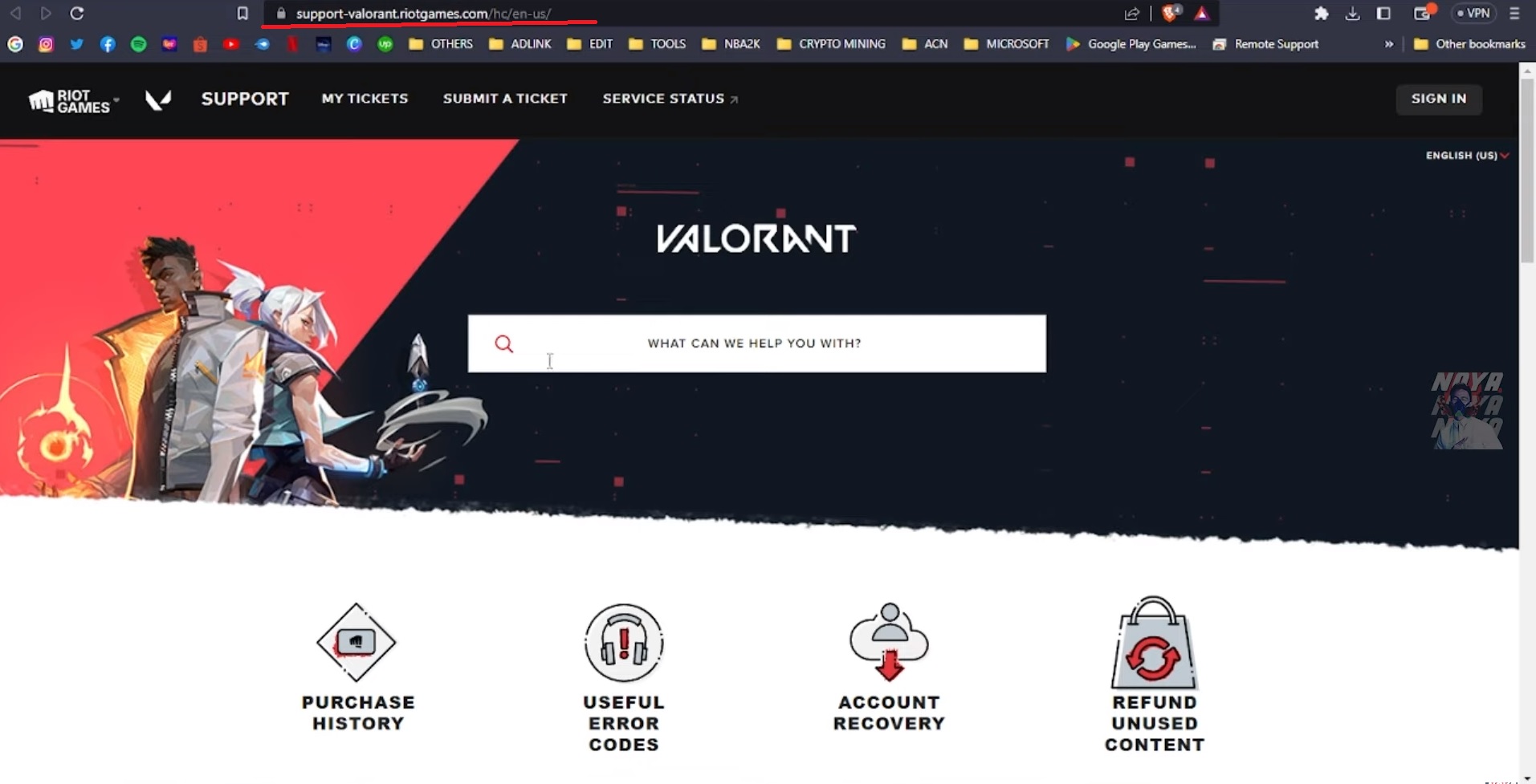
There might be issues with any game that cannot be solved on their own. Valorant, like many other games, has technical support, where players can contact in case of any problems with the game, whether it is an error when starting the game or problems with crediting Valorant Points.Возможно возникновение проблем с любой игрой, которые невозможно решить самостоятельно. Valorant, как и многие другие игры, имеет техническую поддержку, куда игроки могут обратиться в случае любых проблем с игрой, будь то ошибка при запуске игры или проблемы с зачислением Valorant Points.There are short and full instructions here. The full version you can find below, and if you need to submit your request quickly, here is the short version: Здесь есть краткие и полные инструкции. Полную версию вы можете найти ниже, а если вам нужно быстро отправить запрос, вот краткая версия: Go to support-valorant.riotgames.com Перейдите на support-valorant.riotgames.com Scroll down the page and click the red “Submit Request” button Прокрутите страницу вниз и нажмите красную кнопку «Отправить запрос» Choose the type of request similar to the type of problem Выберите тип запроса, соответствующий типу проблемы Sign in to your account if required Войдите в свой аккаунт, если это необходимо Fill in the fields with the details of the problem Заполните поля с деталями проблемы Click the “Send” button at the bottom of the page Нажмите кнопку «Отправить» внизу страницы After sending the request, you just need to wait — Valorant technical support cannot immediately respond to all requests, so it might take time. Don’t forget to check your mail and spam folder! После отправки запроса вам остается только ждать — техническая поддержка Valorant не может сразу ответить на все запросы, поэтому это может занять некоторое время. Не забудьте проверить свою почту и папку спам! In order to write to Valorant support, you need to go to their website: support-valorant.riotgames.com. The site has many sections with various useful information. If you have a problem, you should first try to find the answer on the site: it is quite possible that someone has already encountered the same problem and there is an article with the answer on the site. Чтобы написать в поддержку Valorant, вам нужно перейти на их сайт: support-valorant.riotgames.com. На сайте есть много разделов с различной полезной информацией. Если у вас возникла проблема, сначала попробуйте найти ответ на сайте: вполне возможно, что кто-то уже столкнулся с той же проблемой и на сайте есть статья с ответом. There is a field for searching for the answer to a particular question at the top of the page, you can use it: В верхней части страницы есть поле для поиска ответа на конкретный вопрос, вы можете использовать его: Scrolling down the page, you can find a button to contact support, in case the ready-made articles on the site did not answer your question. There are also two sections with interesting and useful articles that you can look at if the headlines suddenly interest you. Прокручивая страницу вниз, вы можете найти кнопку для связи с поддержкой, если готовые статьи на сайте не ответили на ваш вопрос. Также есть два раздела с интересными и полезными статьями, которые вы можете просмотреть, если вас вдруг заинтересуют заголовки. How to write to Valorant technical support? Как написать в техническую поддержку Valorant? Of course, the site cannot provide answers to all questions and all problem solutions. There are technical support workers ready to assist players in a difficult situation. In order to write a letter and get a response from one of them, you need to click the red “Submit Request” button in the middle of the page. Конечно, сайт не может дать ответы на все вопросы и решения всех проблем. Есть сотрудники технической поддержки, готовые помочь игрокам в сложной ситуации. Чтобы написать письмо и получить ответ от одного из них, нужно нажать красную кнопку «Отправить запрос» в центре страницы. After clicking the button, you will see a page with a choice of request type. You need to select the topic of the request in the dropdown list: just a review / question, problems with your account, game, etc. To submit a request for most topics, you will need to be logged into your account, except when you cannot log in. You can do this by clicking the upper right corner of the page or the button that appears when you select the request type. После нажатия кнопки вы увидите страницу с выбором типа запроса. Вам нужно выбрать тему запроса в выпадающем списке: просто отзыв / вопрос, проблемы с аккаунтом, игрой и т. д. Для отправки запроса по большинству тем потребуется войти в свой аккаунт, за исключением случаев, когда войти не удается. Вы можете сделать это, нажав в верхнем правом углу страницы или кнопку, которая появляется при выборе типа запроса. After selecting the type of request, you will need to fill in the fields on the screen. They are different for each type, but it is easy to fill them in — their content is directly related to the topic of the request. Marked fields must be completed, while others are optional. For example, here is what you will have to specify to send a request about a problem with Valorant Points: После выбора типа запроса вам нужно заполнить поля на экране. Они отличаются для каждого типа, но их заполнение легко — их содержание напрямую связано с темой запроса. Обязательные поля должны быть заполнены, остальные — по желанию. Например, вот что вам придется указать, чтобы отправить запрос о проблеме с Valorant Points: After filling in all the fields, you can click the “Send” button. Valorant technical support will answer your email, so don’t forget to check it. The answer may take some time, so meanwhile you can try to find the solution on the Internet on your own. После заполнения всех полей вы можете нажать кнопку «Отправить». Техническая поддержка Valorant ответит на ваш электронный адрес, поэтому не забудьте его проверить. Ответ может занять некоторое время, поэтому тем временем вы можете попытаться найти решение в Интернете самостоятельно.
Техническая поддержка Valorant — как связаться
Valorant
916
0
0
3 года ago
admin
Комментарии к этому посту закрыты.




Комментарии
0Пока нет комментариев. Будьте первым, кто оставит комментарий!